

Three taps at the front desk, not three tabs
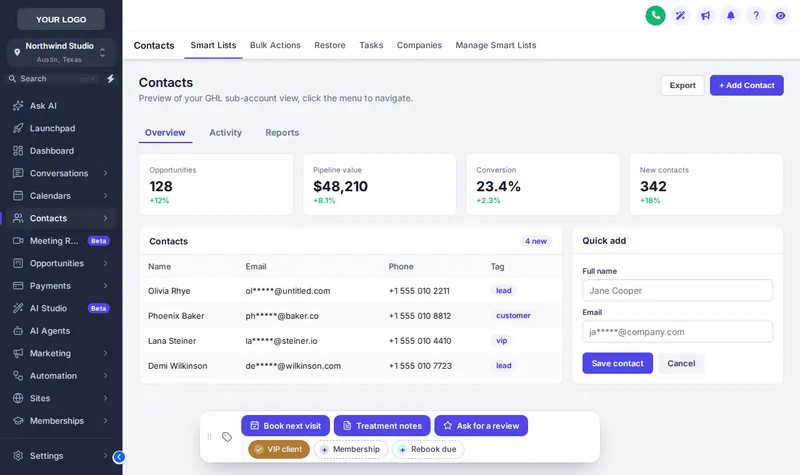
GoHighLevel contact actions put one-tap quick tags and buttons on every contact page. Each one adds a tag that can start a workflow, or opens a short form that fills custom fields. You build the bar in the editor around your spa’s checkout routine.
Three minutes at reception
Client checks out after a facial
The receptionist opens her contact and taps Book next visit. A tag is added and your rebooking workflow sends the link.
She buys a series
Treatment notes opens a small form: package, next visit date, sessions left. The answers land in her custom fields.
She loved it
Ask for a review adds the review tag; your review workflow does the rest. Three taps, no hunting through tabs.
Try the contact actions bar
The chips and buttons here are set up for a spa. Tap a tag, open Treatment notes or drag the bar by its grip.
Loading the live preview…
Buttons and quick tagsThe real contact actions bar on a sample contact. Tap a quick tag, open Treatment notes, or drag the bar by its grip. Nothing is saved in this preview; inside GoHighLevel the contact updates at once.
Chips, buttons and small forms
Quick tags
One-tap chips that add or remove a tag, colored per tag, by brand, or green when on and grey when off.
Workflow buttons
Add, remove or toggle a tag with a success message your team can read at a glance.
Field forms
Short forms that write to custom fields: package bought, next visit, sessions left, allergies to note.
6 positions
Bottom centre, Bottom left, Bottom right, Top centre, Top left, Top right, and the bar can be dragged.
List the repeat actions
Note the tags and fields your front desk sets by hand most often: rebook, VIP, membership, review request.
Turn them into chips and buttons
Quick tags become one-tap chips; multi-field updates become small forms tied to your existing custom fields.
Wire them to your workflows
Each button adds or removes a tag, so any workflow with a tag trigger starts from one press. Try each one on a test contact.
Place the bar
Choose one of 6 positions and which sub-accounts see which buttons.
Contact actions start in Radiance
GoHighLevel contact actions FAQs
A small bar on each contact’s page with one-tap quick tags and buttons. Buttons add or remove tags, which can start your workflows, or open short forms that fill custom fields.
Yes. Buttons add, remove or toggle tags, so any workflow with a "tag added" or "tag removed" trigger starts from one press.
Any custom field in the sub-account, matched by name, key or id. Fields can be text, number, date, drop-down, email, phone or link, and can be required.
If you want it to. Notes can be added to the contact saying which tag was added or removed and by whom, and which field changed.
Yes. Each chip and button can be limited to a list of sub-accounts or shown in all of them, which suits agencies with several spa clients.
No. The preview runs the real bar on a sample page and sends nothing anywhere. Inside GoHighLevel the same presses update the contact.
Radiance at $447 and Signature Suite.
Usually not. The bar triggers the workflows you already have through tags. If you need a new workflow built, that is separate build work, not part of the customizer account.
Works well with
- Menus and navigationSidebar, top bar in 8 styles, 8 mega menu styles and a floating quick menu.From Glow$197
- Pipeline board designs12 opportunities board designs with stage colors that follow your columns.From Radiance$447
- Popups43 popup templates in 7 formats, for GoHighLevel and websites.From Signature Suite$897
Give your front desk one-tap actions
The contact actions bar is part of a Radiance account ($447, one-time) with mega menus and the dashboard and pipeline designers.
One-time payment, lifetime access · no monthly fee · login emailed within minutes (max 24 hours)
GoHighLevel and HighLevel are trademarks of HighLevel, Inc. Beauty and Spa GHL Snapshot is an independent team and is not affiliated with or endorsed by HighLevel. Each package is an account on the GHL Customer Care customizer, a separate product that you set up yourself and that runs through GoHighLevel’s own White Label custom CSS and JS settings. Previews on this page are samples; no client data is shown or collected.