

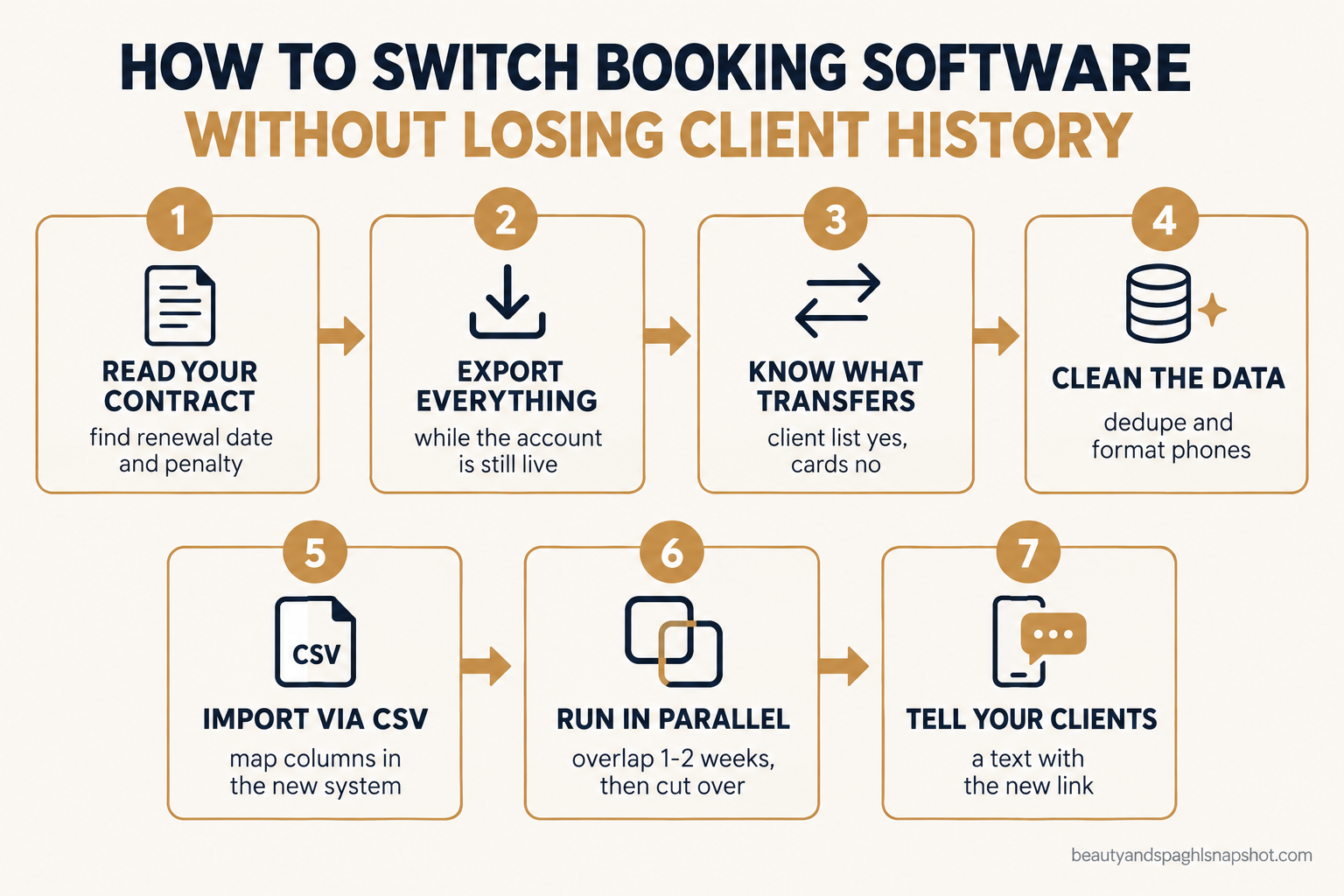
You have decided to leave. The bill keeps creeping up, the software feels like it was built for a gym chain in 2012, and every text to a client is another add-on. Then the fear hits at 11pm: what happens to the eight years of client records inside that account? The phone numbers, the visit history, the allergy notes, the members on file. That fear is the single reason most owners stay stuck on software they hate. They are not loyal. They are scared of the move.
Here is the honest answer. Your client list comes with you almost every time. Your appointment history, notes, memberships and saved cards are a different story, and the horror stories come from owners who learn that on cancellation day instead of two weeks earlier. Switch in the right order and you keep what matters. This is the order.
Table of contents
- What a botched migration actually costs you
- Stage 1: Read your contract before you cancel anything
- Stage 2: Export everything while the account is still live
- Stage 3: Know what actually transfers and what quietly dies
- Stage 4: Clean the data before it touches the new system
- Stage 5: Import into the new system
- Stage 6: Run both systems in parallel, then cut over
- Stage 7: Tell your clients so you keep the rebookings
- Run the move for your size: solo, team, multi-location
- Objections I hear before every switch
- Frequently asked questions
Key takeaways
What a botched migration actually costs you
A software switch feels like an IT task, but it is really a revenue task: what you move is the relationship with every client who pays you. Per the Zenoti 2025 benchmark report, the 42% of clients who visit more than once a year generate around 80% of a salon or spa’s revenue. Their history lives inside your current software: last service, preferred provider, membership, the note that says she books lash fills every three weeks. Lose that and you lose the context that keeps your best clients loyal.
Sources: Zenoti 2025 Benchmark Report (revenue share); Mindbody pricing (commission); Mangomint 2026 pricing; HighLevel help (import limit).
The fear itself is the second cost: it keeps you paying for software you have outgrown. This guide is the other half of what salon and spa software really costs in 2026: how to get out with your history intact.
There is no single “download my account” button on any of these platforms. Your data is scattered across a dozen reports that each export separately, and it splits into five piles: people (names, emails, phones) that moves easily, history (appointments) that is hard, money (sales, package and gift card balances, membership billing) that rarely moves cleanly, saved cards that never move by design, and reviews that stay on the platform or Google. Every stage below pulls one pile out in the right form.
Stage 1: Read your contract before you cancel anything
Before you export a single file, open your agreement and find three things: your renewal date, your notice period, and any early-termination penalty. Vagaro runs month-to-month, so leaving is mostly about timing your final billing cycle. Mindbody is where owners get caught. Its agreements are commonly a 12-month auto-renewing term with an early-termination penalty, a friction point flagged over and over in 2026 operator reviews. Cancel mid-term and you can owe the remainder; miss the notice window and you can be locked in for another year. Check your paperwork against Mindbody’s business terms rather than trusting memory.
The real copy to send. Put your cancellation and data request in writing so there is a paper trail. Steal this:
Subject: Account cancellation + full data export request

Hi [Platform] team,

Please confirm the earliest date I can cancel account
[account #] without an early-termination penalty, and the
written notice you require. Separately, I am requesting a
complete export before that date: client records, full
appointment history (past and future), sales and membership
history, and notes fields. Please confirm the format, any
cost, and the turnaround time.

Thanks,
[Name], owner, [Business]
How it breaks: owners cancel first out of frustration, then find the export locked behind a dead account, or trigger a penalty they could have dodged by waiting for the renewal date. The contract sets your timeline, so read it first.
Stage 2: Export everything while the account is still live
Your export window is open only while your subscription is paid and active, so do this while you are still a customer, not on your way out.
Exporting from Mindbody. There is no single button, so you pull the piles one at a time:
- Client list: Reports, then Clients, Mailing List, set opt-in to all clients, and Export to Excel. It comes out clean. Mindbody documents the path in its export client details help article.
- Appointment history: run the Schedule at a Glance report. On a large account the exporter can time out, so pull it in yearly chunks, past and future separately.
- The full raw export: for everything at once, Mindbody offers a paid Subscriber Data Export you request from support. It takes several business days, and third-party reports put the fee in the low hundreds of dollars, so start it early, not the week you leave.
Exporting from Vagaro. Only the account owner can run these. From Dashboard, Reports, export your customer list and appointment history as Excel, not PDF, so you have editable columns for the import.
Your export checklist, steal it:
[ ] Client list: name, email, phone, address, opt-in status
[ ] Appointment history: past 2-3 years by year, plus future bookings
[ ] Sales / transaction history (records + taxes)
[ ] Memberships + recurring billing (name, plan, price, next bill)
[ ] Gift card + package balances (name, remaining value)
[ ] Client notes / formula notes / preferences
[ ] A full backup saved in two places (cloud + local)
How it breaks: the owner exports only the client list, cancels, and months later needs a package balance or an allergy note that is now gone. Pull all five piles, save two copies, and keep the backup for a year.
Stage 3: Know what actually transfers and what quietly dies
This is the part nobody warns you about until it is too late. Not all data is portable.
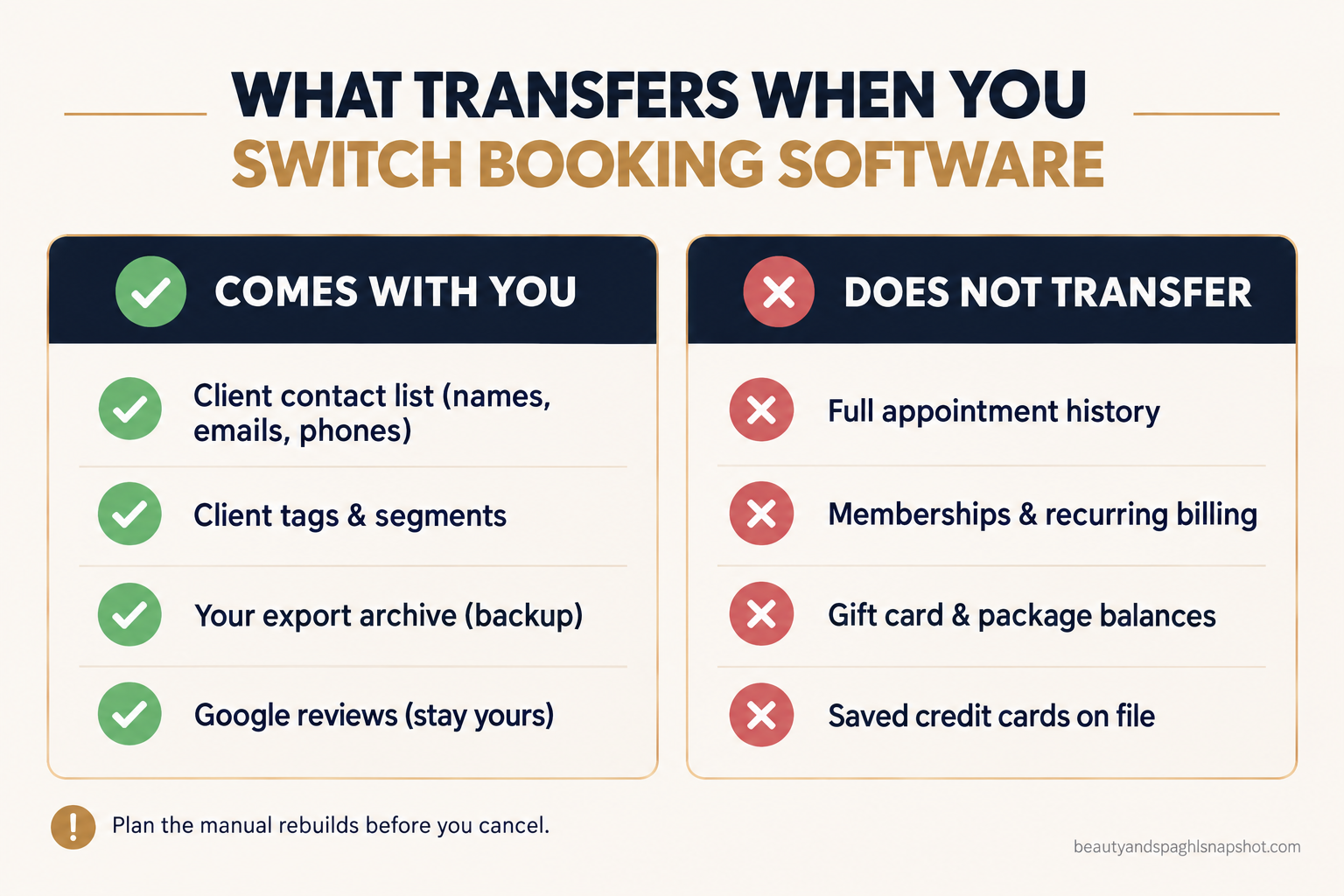
| What you have | Does it transfer? | What to do |
|---|---|---|
| Client contact info (name, email, phone) | Yes, cleanly | Import via CSV. The easy win. |
| Appointment history (past visits) | Rarely as live records | Keep the export as a reference archive. |
| Future/booked appointments | No | Re-enter the next few weeks by hand at cutover. |
| Service and formula notes | Sometimes, if fields map | Map to a notes field, spot-check after import. |
| Memberships and recurring billing | No | Rebuild each plan and re-authorize billing. |
| Gift card and package balances | No | Reconcile and re-enter remaining balances. |
| Saved credit cards on file | Never | Re-collect card-on-file after the move. Security rule, not a limitation. |
| Reviews and ratings | No | They stay on the old platform and on Google. Google reviews are yours. |
The two that catch owners off guard are appointment history and saved cards. Past appointments rarely import as clickable records, so keep the export as an archive. Saved cards never travel with a client list, because card data is locked inside a payment processor for PCI security reasons, so you collect cards again at the next visit.
How it breaks: an owner assumes memberships will “just come across,” switches over a weekend, and on Monday nobody’s billing runs because the plans were never rebuilt. Treat memberships, packages and gift cards as a manual rebuild, and reconcile balances against your export before switching off.
Stage 4: Clean the data before it touches the new system
Garbage in, garbage out. Your export is messy: duplicates, dead numbers, half-empty fields. Clean it in a spreadsheet before importing, because fixing it after is ten times harder. Work through your client file:
- De-duplicate. Sort by phone and email and merge the obvious doubles. Years of front-desk typos create three versions of the same person.
- Format phone numbers consistently, ideally with country code, so texting works on day one. A booking system cannot text a number it cannot read.
- Split the name field into first and last if it is one column, because the new system maps them separately.
- Tag as you go. Add a status column: active, lapsed, member, do-not-contact. This segments your list for the first reactivation campaign.
- Strip the junk rows: test bookings, staff entries, walk-ins with no contact info.
How it breaks: owners import the raw file, phone numbers land in fifteen formats, and reminders fail silently for a chunk of the list, which they find out about when no-shows spike.
Stage 5: Import into the new system
With a clean file, the import is the easy part. Most systems, GoHighLevel included, take a standard CSV upload: Contacts, Import, upload the CSV, map each column to the right field. The platform’s import walkthrough spells out the rules: CSV only, not Excel or Google Sheets, and up to 10,000 rows or 20MB per import, so a big list gets split into a couple of files. For anything without a standard home, like a formula note, create a custom field first and map to it.
Import in an order that avoids re-work: active clients first (tagged active), then lapsed clients as a separate batch (tagged lapsed) ready for a win-back. Rebuild memberships and packages by hand and re-authorize billing. Then spot-check 20 random records: do names, phones and tags look right?
How it breaks: the mapping is rushed, “phone” lands in the “company” field, and the whole list imports useless. Test 10 to 20 rows first, then run the full file. If your build needs custom fields, workflows or a two-way calendar sync, that is where a proper GoHighLevel build earns its keep.
Stage 6: Run both systems in parallel, then cut over
The riskiest move is to flip a switch on Friday and pray on Monday. Do not hard-cut; overlap.
For one to two weeks, keep the old system live and take new bookings in the new one. Yes, you pay for both briefly, and that overlap is the cheapest insurance in the move: a client who booked three weeks ago still has a valid appointment while everything new flows into the system you keep.
Your cutover checklist:
- Point new bookings at the new system. Update the booking links on your website, Google Business Profile, Instagram and link-in-bio.
- Set reminders and confirmations live and send yourself a test booking.
- Turn off booking on the old system so nothing new lands there, but keep it readable.
- Only cancel the old subscription after its last booked appointment has passed and your final backup is saved.
How it breaks: the owner cancels the old system the same day they launch the new one, and a dozen clients show up for appointments that live in a dead account nobody can open. Let the old calendar drain first.
Stage 7: Tell your clients so you keep the rebookings
This step decides whether the migration protects your revenue or leaks it. If a client hits an old booking link that is broken with no explanation, a chunk of them will not chase down the new one. A short, warm heads-up closes that gap.
Send it by text, because a text gets read. SMS runs around a 98% open rate against roughly 20% for email, so the channel that reaches clients during a switch is a text, not a newsletter in a promo folder.
The announcement text, steal it:
Hi [First name], it's [Studio]. We upgraded our booking
system to make scheduling easier for you. Book your next
visit here: [new link]. Your history and preferences came
with us, so nothing changed on your end. Reply STOP to opt out.
Back it with one email carrying the same message and link.
How it breaks: the owner switches quietly and hopes nobody notices. Regulars hit a dead link, assume you closed, and drift. Announce the change, frame it as an upgrade, and hand them a working link. This is also the moment to reawaken the lapsed clients you tagged in Stage 4, using our guide to winning back lapsed spa clients.
Average open rate by channel. The switch announcement reaches clients when it is a text. Source: Sender (email reflects the common ~20% industry average).
Keep it compliant: marketing texts need prior consent and a real opt-out (the STOP line), per the FCC’s guidance on unwanted texts. Our spa SMS marketing guide has the consent language.
Run the move for your size: solo, team, multi-location
The seven stages are the same for everyone. How heavy each lands depends on your shop.
Solo operator or 1 to 2 chairs. Your data is small, so export and clean is one afternoon. Your risk is the cutover, since you cannot babysit two systems mid-facial. Keep the overlap short, re-enter your own booked appointments personally, and lean hard on Stage 7. With no complex memberships, your move is the simplest.
Mid-size team, 3 to 8 providers. Your complexity is memberships, packages and multiple provider calendars. Budget the most time for the manual rebuild of recurring billing, and reconcile every membership against your export before you switch off, or someone’s autopay silently fails. Assign one person to own the migration.
Multi-location chain. Do not migrate every location at once. Pilot the smallest or newest one, fix what breaks, then roll the proven playbook out site by site. Standardize the cleaned data format and the client announcement. A botched central membership rebuild hits every location, so this is where a professional migration pays for itself. Our Mindbody-to-GoHighLevel move for a multi-app med-spa walks through the trade-offs.
Objections I hear before every switch
“I’ll lose all my client history, so it’s not worth the risk.” Your client list, which lets you contact and rebook everyone, comes across cleanly. What does not import automatically is the log of past appointments, which you keep as a searchable archive.
“I’m locked into a Mindbody contract, so I can’t leave.” You can, you just time it. Find your renewal date and notice period, then plan the move to land at or just after it so you dodge the penalty. Cancelling mid-term is the mistake; Stage 1 is the fix.
“I already pay for booking software. Why add GoHighLevel on top?” For most owners it is instead of, not on top. The bill climbs because texting, a branded app, marketing and reviews are add-ons, and commissions stack quietly. Mindbody charges a 20% commission on new clients booked through its marketplace, and Mangomint moved to $120 a month per location plus $10 per user in August 2026 with phone as a paid add-on. Consolidating everything into one system is usually why people move, and we put the numbers side by side in what spa software really costs.
Frequently asked questions
Can I export my full client list from Mindbody or Vagaro?
Yes. Both let the account owner export a client list with names, emails and phone numbers to a spreadsheet. In Mindbody it is under Reports, Clients, Mailing List, Export to Excel; in Vagaro it is under Dashboard, Reports, Export Customer List. The client list moves cleanly; appointment history, memberships and saved cards do not.
Will my past appointment history transfer to the new system?
Usually not as live, clickable records. Past appointments almost never import into a new calendar as real bookings. You export the history, keep it as a searchable archive, and re-enter only the upcoming booked appointments by hand at cutover. You keep the information, you just do not get the old calendar recreated.
Do my clients' saved credit cards move to the new platform?
No, by design. Saved card data is locked inside a payment processor for PCI security reasons and never transfers with a client list. You re-collect card-on-file at each client's next visit, which clients expect when a business switches systems.
Am I stuck if I signed a Mindbody contract?
No, but timing matters. Mindbody agreements are commonly a 12-month auto-renewing term with an early-termination penalty, so find your renewal date and notice window, then plan your switch to land at or just after that date. The costly mistake is cancelling mid-term. Read the contract before you export.
How long does a booking software migration take?
For a solo operator, export and clean is an afternoon and the whole move can be done in a week. For a multi-provider shop with memberships to rebuild, plan for two to four weeks, most of it spent cleaning data and rebuilding recurring billing rather than importing. Always overlap the old and new systems for a week or two before you cancel.
The takeaway
Switching booking software is not the leap of faith it feels like at 11pm. It is a sequence: read the contract so timing does not cost you a penalty, export all five piles while the account is live, clean the file, import it, overlap the two systems, and tell your clients with a link that works.
Do it in that order and you keep the years of relationships that make your business worth running. The software was never the asset. Your clients are.