It is 9:52 on a Friday and your 10:00 microneedling client is in the parking lot, filling out a clipboard on her knee because she booked online and nobody sent her anything beforehand. Your front desk is doing two jobs at once: checking in the 9:45 facial and typing this client’s medical history off a photo of a smudged page. The 10:00 starts late, the 10:45 runs into lunch, and by 2pm the whole day is behind. Somewhere in that pile is a consent form she signed without reading.
Here is the short version, because you have treatment rooms to turn over. A paperless intake system works when the form goes out automatically the moment someone books, asks only what you will actually use, captures real consent in writing, stores sensitive answers somewhere safe instead of a text thread, and chases itself so your front desk never has to. Get those right and the client walks in ready, the room runs on time, and your records hold up. Below is the whole system, the wording to copy, and the legal line a med spa cannot cross.
Table of contents
- Why your intake process is quietly costing you money
- The seven-stage paperless pre-visit system
- Stage 1: Send the form automatically at booking
- Stage 2: Build a form people actually finish
- Stage 3: Capture the three consents in writing
- Stage 4: Keep sensitive data off text and email
- Stage 5: Chase incomplete forms without lifting a finger
- Stage 6: Wire the form to booking, deposits and reminders
- Stage 7: Reuse the data without breaking the rules
- Solo studio, mid-size spa, multi-location med spa
- The compliance line you cannot cross
- Steal these: forms, consent language and messages
- Objections
- FAQ
Why your intake process is quietly costing you money
The medical aesthetics industry in the US has eclipsed $17 billion and is growing by more than a billion dollars a year, according to the American Med Spa Association. That growth pulls owners from cuts, facials and waxing into injectables, peels and lasers, where the paperwork stops being a formality and becomes a legal record.
A bad intake process is not one big bill, it is a slow leak. A client filling the form out at the door delays the appointment, and a late start compounds all day. A medical history typed off a clipboard gets typos, and a typo in an allergy field is the kind of mistake that ends careers. A photo consent nobody can find is a before-and-after you never get to post.
The fix is not “get better software.” It is treating intake as a short, automated conversation that happens before the client arrives, not a stack of paper after. For the money side (deposits and confirmations), pair this with our no-show deposit policy that actually gets paid.
The seven-stage paperless pre-visit system
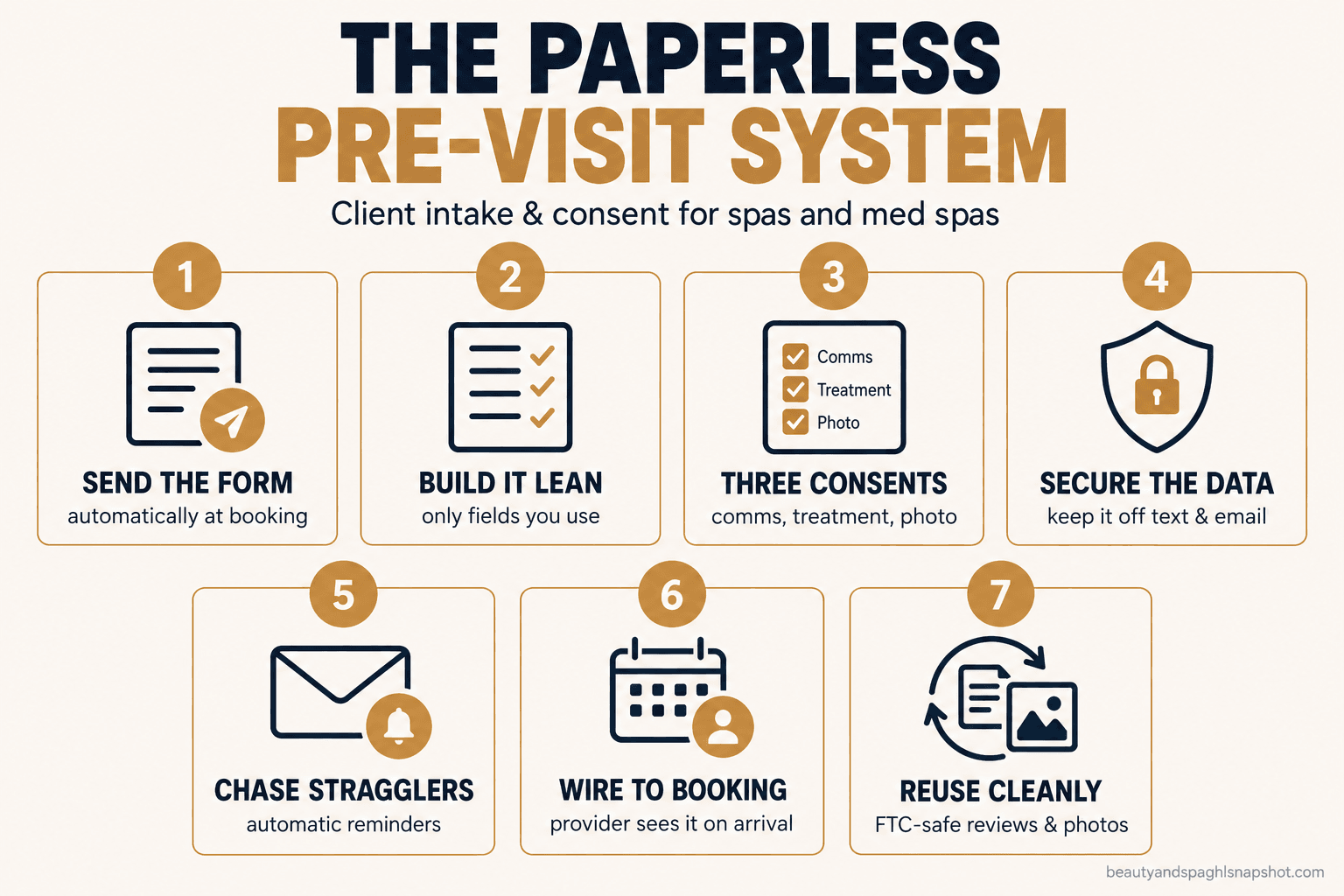
Here is the whole thing in order: send the form at booking, build one people finish, capture the three consents, secure the data, chase stragglers, wire it to booking and reminders, then reuse the data cleanly. Each stage has a way it quietly breaks.
Stage 1: Send the form automatically at booking
The single biggest mistake is sending the form too late. It should go out the second a booking is confirmed, by text with a tap-to-open link, not a PDF nobody opens on a phone.
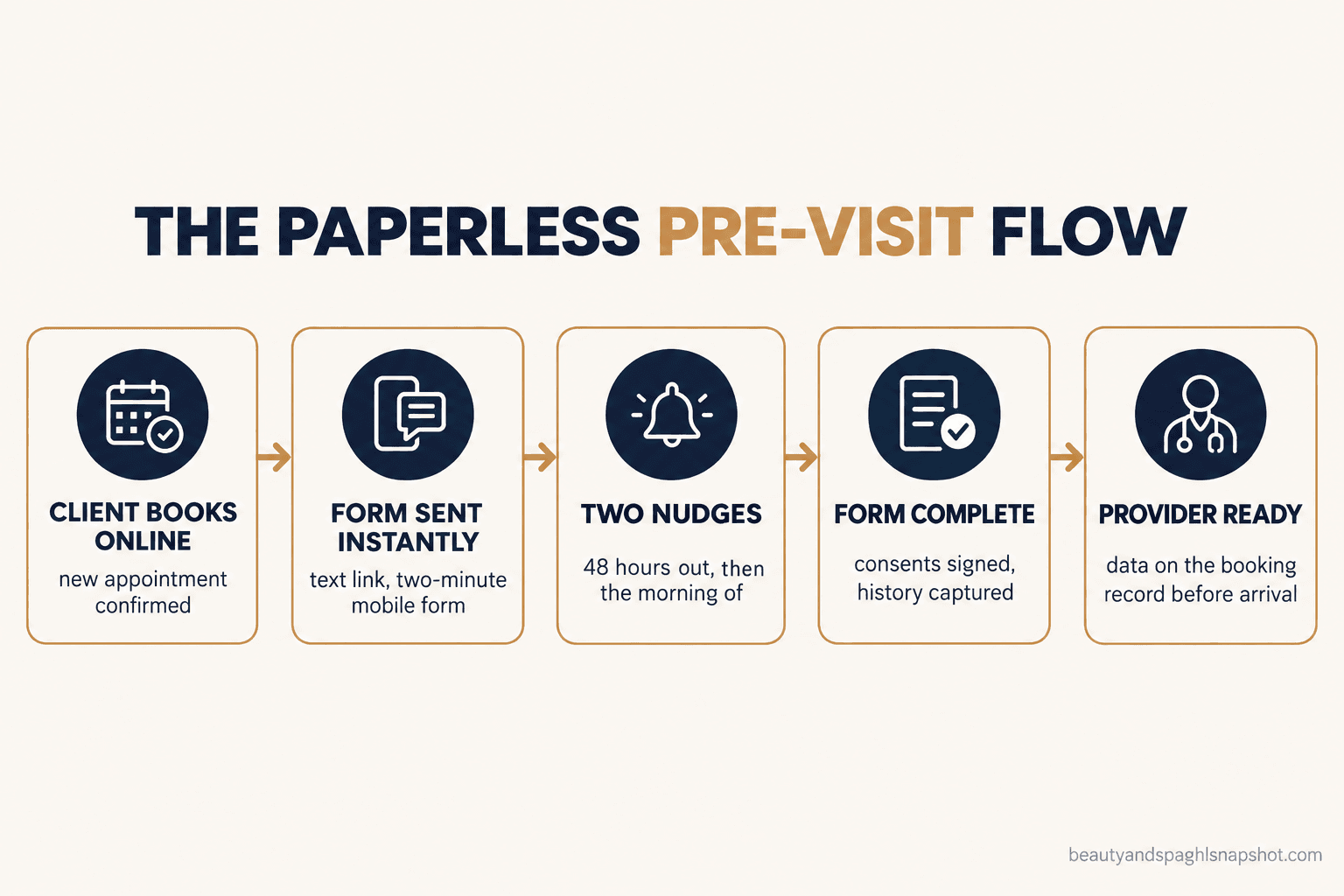
The timing that works: send it immediately at booking, a reminder 48 hours before, and a final nudge the morning of if it is still not done. For a treatment that needs a medical history, make completion a soft gate: the slot stays booked but held pending the form.
How it breaks: the form lives behind a login or gets emailed, so completion sits around a third and your front desk fills the gap by hand. A link that opens in one tap, on mobile, with the client’s name pre-filled, is the difference between high completion and low. When your booking and form tools do not talk, you chase forms forever, which is the handoff our appointment automation is built to remove.
Stage 2: Build a form people actually finish
The goal is not a complete medical workup. It is the smallest set of answers that changes what you do in the room or afterward.
For a pure beauty service (facial, massage, wax, lashes), you need almost nothing: name, contact, how they heard about you, product allergies, and the communication consent. For a medical or medical-adjacent service (injectables, peels, laser, microneedling), you add a real health history (full field list in the “steal these” section below).
Split a long form into short steps with a progress bar. Use plain language, not clinical jargon. Default to “no” on the condition checklist so the client taps instead of types. Ask “how did you hear about us” once; it is the only reliable attribution you will ever get.
How it breaks: the form is one giant scroll of 40 fields, half of them pointless. People bail at field 12, and you are left with a half-finished record and a client annoyed before she walks in. Cut every field you cannot point to a reason for.
Stage 3: Capture the three consents in writing
This is the stage that protects the business, and the one most spas get sloppy about. There are three separate consents, and they are not the same yes.
Communication consent (TCPA). Before you text or email marketing, you need express consent, with a clear opt-in and an honored opt-out: a checkbox with plain wording, not a line buried in your terms.
Treatment consent. For any medical or medical-adjacent service, the client consents to the specific procedure, its risks and aftercare. For injectables and lasers this is not optional and often has to be reviewed by a licensed provider. It is a legal document, not a marketing form.
Photo and media release. To post a before-and-after, you need written permission to use that client’s images. A general “we may use photos” line is weaker than a clear, separate release the client actively agrees to.
How it breaks: one checkbox tries to do all three jobs (“I agree to everything”), so none of them hold up well if challenged, and a client who only wanted the facial has technically “consented” to marketing and photo use she never understood. Keep them separate. Each is its own yes, timestamped and stored.
Stage 4: Keep sensitive data off text and email
This is where the beauty spa and the med spa split hard. A pure beauty or day spa (facials, massage, waxing, nails), with no medical procedures and no insurance billing, is generally not a HIPAA covered entity, because there is no protected health information and no covered transaction. A med spa becomes HIPAA-relevant when licensed medical providers perform medical procedures and it conducts covered electronic transactions such as billing insurance. Under HHS guidance and 45 CFR 160.103, a provider is covered only when it transmits health information electronically for one of those transactions.
Most med spas are cash-pay and may sit outside covered-entity status, but that is a thin reed. The moment medical staff and procedures are involved, treat intake answers, treatment photos and consult notes as protected: out of unsecured SMS and personal email, stored in an access-controlled system, never in a shared inbox.
How it breaks: a provider texts a client’s before photo to the owner’s personal phone, or the front desk emails a filled intake form to a gmail account to “have a copy.” Now sensitive data sits in two insecure places with no access control. Decide once where intake data is allowed to live, and keep it only there.
No-show rate, control vs text-reminder group. Source: Lin CL et al., Int J Pediatr, 2016 (RCT).
Stage 5: Chase incomplete forms without lifting a finger
A form 60 percent done is worth almost nothing. The system has to chase the rest automatically, so your front desk is not making awkward “did you fill out the thing” calls.
Set two nudges: one 48 hours out, one the morning of, both short and warm. The morning-of nudge does double duty as the appointment confirmation, which is the part that protects the slot (see the reminder data in the chart above).
How it breaks: the reminders are manual, so on a busy day nobody sends them, and the busy days are exactly when you need the room to run on time. Automate the nudges off the form’s completion status: if it is done, confirm; if not, send the link again. For the full set of reminder and rebooking messages, our front-desk scripts post has the wording.
Stage 6: Wire the form to booking, deposits and reminders
The form should not be an island. When a client completes it, the answers land on the booking record where the provider sees them, the communication consent flips the client to “okay to text,” and for a high-value treatment completion can tie to a card-on-file deposit so the slot is secured.
The point is that the provider walks into the room already knowing the client is pregnant, or on a blood thinner, or allergic to lidocaine, without flipping through paper. This is the CRM and workflow layer doing its job: one action (form completed) triggering the right updates everywhere.
How it breaks: the form tool and the booking tool are separate, so a staff member retypes the answers into the calendar, introducing errors and wasting the time the form was meant to save. Two systems that do not talk give you digital paper, not a system.
Stage 7: Reuse the data without breaking the rules
Clean intake data is an asset: before-and-after photos, reviews, reactivation lists. But 2026 has rules about using it.
On photos, the FTC expects advertised results to be typical or clearly disclosed. On reviews, the FTC’s rule on consumer reviews and testimonials has been in force since October 21, 2024 (FTC). It bans fake reviews, conditioning an incentive on a review being positive, and suppressing honest negative ones. In practice that kills “review gating,” routing happy clients to Google and unhappy ones to a private inbox: you can ask every client for a review, but you cannot filter who gets asked by how they felt.
How it breaks: a well-meaning automation asks only 5-star clients for a public review, or posts a before-and-after with no “results vary” context and no signed release. Both are now explicit problems, so build the reuse on consent you collected and claims you can back. Our HIPAA and FTC compliance guide goes deeper.
Solo studio, mid-size spa, multi-location med spa
The same system, sized three ways.
Solo esthetician or booth renter (pure beauty). You are almost certainly not a HIPAA covered entity. Keep it light: one screen with contact details, product allergies, the communication consent, and a photo release if you post work. No medical history for a facial. What you do need is the automatic send and the morning-of confirmation, because a solo operator cannot also chase forms between clients.
Mid-size day spa adding medical-adjacent services. This is the trickiest spot, because you cross the line without noticing. The day you add microneedling, medical-grade peels or anything a provider signs off on, your intake needs a real health history and a treatment consent for those services. Run two form paths, light for beauty and full for medical-adjacent, triggered by the service booked, and treat the medical-adjacent data as protected even if you are cash-pay.
Multi-location med spa with a medical director. Now consent, provider review and data security are not optional. Treatment consents may need a provider’s review before the appointment, and intake data is protected health information in practice: stored with access controls, visible to the provider, not floating in texts. Standardize one form set across locations so a client who visits two sites has one record. For the conversion side of a med spa funnel, see our med spa consultation conversion playbook.
The compliance line you cannot cross
HIPAA. Covered-entity status hinges on medical providers performing medical procedures plus covered electronic transactions (HHS, 45 CFR 160.103). If that is you, treat intake and photos as protected health information; a pure beauty spa is usually exempt but still bound by state privacy law. Either way, keep medical answers out of unsecured texts.
TCPA. Marketing texts and emails need express written consent and an honored opt-out, collected as their own checkbox. That is not the same as reminders for an appointment they booked.
FTC. Advertised results typical or disclosed, and no fake reviews, incentives tied to sentiment or review gating, in force since October 2024 (FTC). State boards also scrutinize “FDA-approved” and “medical grade.” None of this is legal advice; have a med spa’s consent documents reviewed by a lawyer in your state.
Steal these: forms, consent language and messages
Copy these, change the names, keep the structure. Bracketed parts are yours to fill.
Objections
“My clients hate filling out forms on their phone.” They hate a bad form: a 40-field scroll with a tiny submit button. A two-minute, stepped form with their name pre-filled and most answers a single tap is a different thing. The paper clipboard in your waiting room is the worse experience, and it costs you the start time too. Fix the form, not the channel.
“I already use paper forms and it’s fine.” It is fine until it is not. Paper cannot be sent before the visit, cannot trigger a confirmation, and cannot prove when consent was given. The day you add a medical-adjacent service, it goes from inconvenient to a genuine liability.
“What if a client refuses to sign the treatment consent?” For a medical or medical-adjacent service, no signed consent means no treatment, and that is not a policy you bend. The system makes this cleaner: the client completes consent before arrival, so you find out about a refusal while the slot can still be rebooked.
FAQ
Is my spa a HIPAA covered entity?
Usually only if licensed medical providers perform medical procedures AND you conduct covered electronic transactions, such as billing insurance. A pure beauty or day spa with no medical procedures and no insurance billing is generally not a covered entity under HHS guidance and 45 CFR 160.103. Many cash-pay med spas may sit outside that status too, but once medical staff and procedures are involved, treat intake data as protected anyway.
Can I send intake forms and reminders by text?
Yes for the form link and appointment reminders, if you have consent and honor opt-outs (TCPA). What you should not do is send a client's completed medical history or treatment photos back through unsecured SMS or personal email. The link is fine; the sensitive answers belong in an access-controlled system.
How many fields should an intake form have?
As few as change the treatment or the follow-up. A pure beauty intake can be one short screen. A medical-adjacent intake needs a real health history, but default to "no" on condition checklists so clients tap instead of type. Every extra field lowers completion, so cut anything you cannot point to a use for.
What is review gating and why does it matter for intake?
Review gating is filtering who you ask for a public review based on how they feel, for example sending happy clients to Google and unhappy ones to a private form. The FTC's rule on consumer reviews and testimonials, in force since October 21, 2024, prohibits this (FTC). If your post-visit automation asks for reviews, it has to ask everyone.
What if a client does not finish the form before the appointment?
Your automation nudges twice (48 hours out and the morning of), and the morning-of nudge doubles as the confirmation. For medical-adjacent services, treat completion as a soft gate: the slot is held pending the form, so if someone will not complete it you find out while there is still time to rebook the room.
Back to that Friday morning. In the paperless version, the microneedling client got her form by text the minute she booked, finished it two nights earlier, and got a morning-of confirmation that doubled as the last nudge. She walks in at 9:58, her health history and signed consents already on the provider’s screen. The room starts on time, and the record that protects your business is where it belongs.